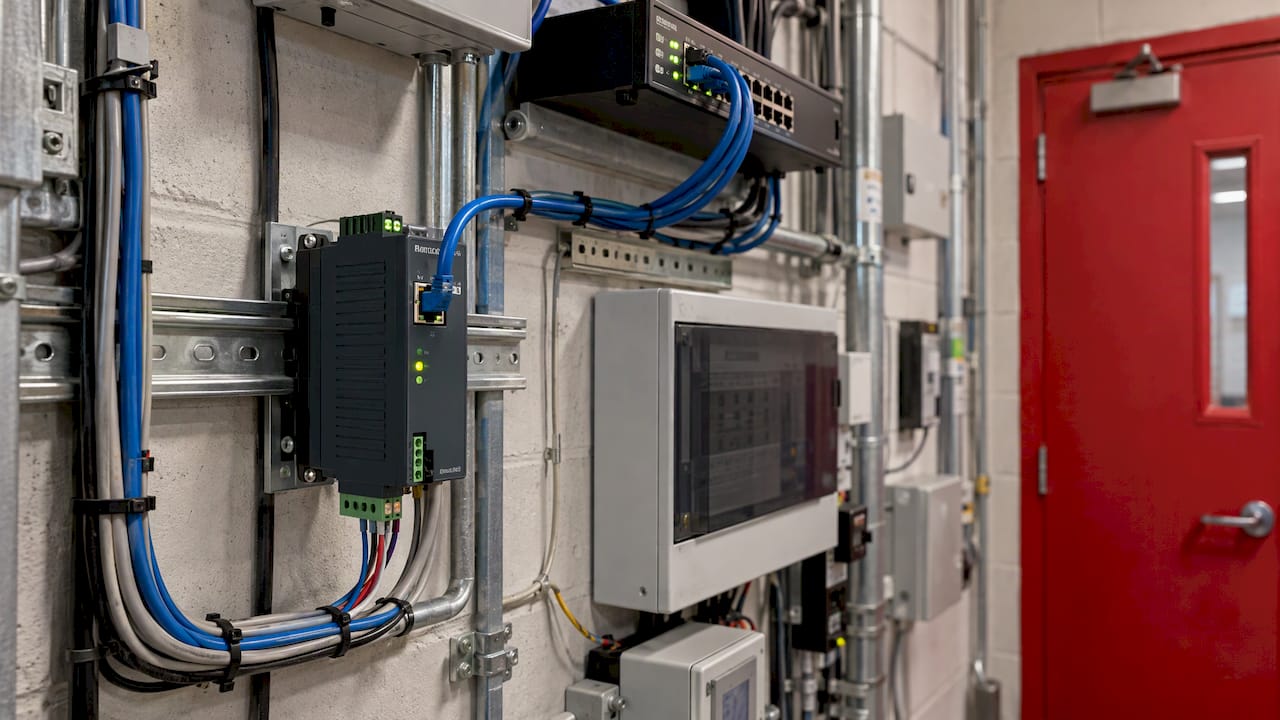
The key difference between Modbus RTU and TCP is simply the medium on which the Modbus protocol sits. With RTU, this is typically a daisy-chained RS-485 or RS-232 bus, allowing a single Master to sequentially interrogate each device. With TCP, devices sit on an IP network and can therefore be accessed by multiple clients over switch fabric.
You will usually want to deploy Modbus RTU if continuing from an existing serial installation. If starting from scratch, and wanting to connect multiple devices and clients, Modbus TCP will be your choice. If you need to expose RTU devices to higher level systems, then some form of gateway is required. This is the task most commonly undertaken at PODTECH.
PODTECH Connects Modbus Devices to Building Systems
PODTECH develop bespoke solutions to link a range of plant and assets together, including BMS, PMS and NMS platforms.
VisitTL;DR
- Data format is common to both. Only the ADU differs.
- RTU is typically deployed in low-bandwidth or extended-range scenarios. TCP scales better in terms of number of devices and number of clients.
- There is no mechanism within either protocol to provide user authentication or data confidentiality. You must implement these via network configuration and intermediate devices.
- You will likely encounter a combination of RTU and TCP in your project. Typically, you will expose the devices via some form of gateway, for example to the BMS, SCADA or an MQTT broker. Your success here will depend largely on how the registers are laid out.
- It is important to know the register layout. In particular, the byte and word sequence and starting offset, usually 0. These details should be documented.
Table of Contents
- What actually differs between RTU and TCP
- Speed, timing and determinism
- Distance, node count and cost
- Where Modbus TCP lives on the network
- RTU over TCP is not Modbus TCP
- Register mapping: where integrations succeed or fail
- Bridging Modbus into BMS, SCADA and MQTT
- Knowing the limits of Modbus
- RTU or TCP: a decision checklist
- How PODTECH approaches Modbus integration
- Our view
- FAQ
- Sources
What actually differs between RTU and TCP
As noted previously, both protocols consist of a Modbus PDU, meaning a function code and its associated parameters. The ADU adds further fields to the PDU to complete the message. The table below summarises the key differences.
| Aspect | Modbus RTU | Modbus TCP |
|---|---|---|
| Physical layer | Serial, RS-485 or RS-232 | Ethernet (IP) |
| Slave address | Single 8-bit value (1-247 inclusive) | IP + 8-bit Unit ID |
| Message delimitation | 3.5 characters of idle time | MBAP header (7 bytes): Transaction ID, Protocol ID, Length, Unit ID |
| Integrity | CRC-16 appended to message | N/A, provided by underlying TCP |
| Number of clients | Single Master only | Many, connected to a switch |
| Destination port | N/A | 502 |
The structure of the Modbus TCP ADU is set out in the Messaging Implementation Guide. Notably, the Transaction ID and Protocol ID are both 16 bits, and the latter is assigned a fixed value of 0. The final field is the Unit ID, and allows one or more RTU devices to be presented on a common IP address.
Importantly for our discussion, the first implication is that there is no CRC in Modbus TCP. Secondly, the requirement for a period of inactivity to terminate each RTU message cannot be met using TCP, leading us to the topic of RTU over TCP later in this article.
Speed, timing and determinism
In terms of raw message speed, Ethernet is clearly superior to a serial connection. Depending on the baud rate, only a few messages can be passed between the Master and all the RTU slaves each second. Obviously increasing the baud rate will improve this figure, but the fundamental limitation of a shared serial bus remains.
However, the Messaging Implementation Guide states that there is no defined Modbus TCP message response time. Given that the protocol may be used to communicate to I/O systems requiring less than 1ms responses, and potentially across wide-area radio links, the client timeout should reflect this. If too short, re-transmissions will exacerbate the load on the TCP network.
Conversely, as explained in NI's Modbus guide, the sequential nature of the RTU protocol ensures that there are no competing messages to contend with. While the maximum message transfer rate is significantly reduced compared to TCP, the response time from each device is known and can be factored into the overall communication loop. The downside is that the RTU slave or slaves will not be aware of a failure in the link, placing that responsibility on the engineer implementing the system.
Summary:
- TCP: Increased bandwidth, simultaneous messages, dependent on network characteristics
- RTU: Reduced bandwidth, known loop time, increases with each additional device on the serial bus
Distance, node count and cost
If there's one protocol that allows RTUs to continue being viable, it's RS-485. It supports approximately 1,200m cable length at lower baud rates using twisted pair, without any requirement for intermediate switching, local power, or IP. By contrast, copper Ethernet cabling can only go 100m, requiring either additional switches or conversion to optical, both of which require local power and cabinet.
The scaling behavior of TCP is almost the opposite. To connect an extra device, you simply terminate another port on your switch. There are no penalties, other than hardware cost, for increasing the size of the network. With serial communication, the ability to poll each node increases as you reduce the number of attached devices, and so does the robustness of the install required.
So the general advice is: use RTU if you have a reasonable number of devices in a single location, or need to extend a run to a distant point. Use TCP if your devices are distributed over a large area, multiple levels or separate buildings, or if multiple parties will want to access the devices.
In some cases, individual RTU-compatible equipment will be significantly cheaper than the equivalent TCP device, for example sub-meters, often in the order of 30-50% depending on device. This can compound substantially for larger deployments. Of course, that initial saving must be balanced with the requirement for extra gateway or gateways and associated development to expose the information.
Placing Modbus devices on the network
Any Modbus device will advertise itself as a server on TCP port 502, available to any suitable client such as a BMS, data logger, SCADA or external software. If your existing installation comprises an IP network, connecting further devices should be very straightforward.
Of course, there is an inherent security vulnerability in doing so. There is no form of login or data encryption for either RTU or TCP. Any party able to route traffic to the device's port 502 can therefore read and, where appropriate, manipulate the device's data. The obvious steps to mitigate this are:
- Assign the devices to a restricted VLAN.
- Only permit inbound port 502 connections from specific IPs.
- Avoid traversing a firewall into a public network.
- Ideally, implement a single polling station per Modbus device.
These considerations can be satisfied at the network distribution point, using a simple 8-port 1G switch in a plant room or to distribute to a number of panels.
RTU via TCP != Modbus TCP
Many people will attempt to interface a serial-to-Ethernet converter directly to their system. This will pass the original RTU data, with CRC, through a TCP session. While superficially similar, this will require the receiving application to know how to accept data in RTU-over-TCP format. In particular, it will not recognize the MBAP header.
Two things to note here:
- Converter port assignments may differ. For example, ModBee recommends 4001, 8899 or 26.
- As there is no idle time between consecutive messages, the receiving party must identify the message function code, determine the message size, read the corresponding number of octets and finally verify the CRC.
Alternatively, you can purchase a true RTU to TCP converter, which accepts the incoming TCP message, removes the MBAP and generates a new message with appropriate CRC to drive the target RTU link. These products are distinct from simple converters and BACnet routers. It's worth verifying your product selection prior to receipt.
Finally, note that a Modbus RTU message sent to the Ethernet interface of a device may not be relayed to its serial port. If the two interfaces are electrically independent, there is no mechanism for this to occur. Consequently, a sequence of Master to RS-485 to Slave to Network to Slave cannot propagate an RTU frame.
Dealing with register addresses
Regardless of the communications method, the structure of the Modbus data space remains unchanged. By specifying a function and an integer address from 0 to 65535, a particular coil, discrete input, input register or holding register can be interrogated. Note that the common convention is to quote references starting at 40001, meaning PDU address 0. Some product literature will state addresses accordingly, but software may assume 0-based indexing, leading to an easy-to-make mistake on day 1.
As detailed in the Liebert IntelliSlot guide, the standard reference bands are:
| Type | Reference | Permissions |
|---|---|---|
| Coils | 1-9999 | R/W |
| DIs | 10001-19999 | RO |
| IRs | 30001-39999 | RO |
| HRs | 40001-49999 | R/W |
Integers will be represented in signed 2's complement form. For example, a value of -7 would be transmitted as FFF9h or 65529.
Endianness
Because Modbus registers are 16 bit, any 32 bit value will take up 2 consecutive ones. Different manufacturers have chosen different conventions as to the first half of this. Per the MBMap spec, given a value of 0x0A0B0C0D we therefore see the following 4 possible sequences:
- Big-endian byte and word: 0A 0B 0C 0D, as defined in Modbus.
- Big-endian byte, little-endian word: 0C 0D 0A 0B. This is widely used by meter and PLC vendors.
- Little-endian byte, big-endian word: 0B 0A 0D 0C, known as byte-swapped. Very uncommon.
- Little-endian byte and word: 0D 0C 0B 0A.
When presented with an apparently meaningless reading from a temperature point, it is almost certainly due to incorrect assumption of register word sequence.
Contents of a practical Register Map
Simply enumerating the relevant Modbus points, for example 40125, does not constitute a Register Map. At a minimum each entry should record function code, base address, number of registers, type, sequence, read/write permission, units, multiplier, min-max range and bad-value behaviour. Ideally there will be a revision. Given the likelihood of changes when firmware is updated, the Register Map should be kept in a controlled repository and referenced against the live stock of assets.
Of course there are further considerations, including the Rockwell limit that only 63 registers can be modified in a single Modbus call using function code 16, and that a coil is energised by setting it to 65280 or 0xFF00.
Integrating Modbus with other technologies
As discussed above, most sites will find themselves having to integrate Modbus RTU and TCP.
With BMS and SCADA — Serial devices can typically be made available on a Modbus TCP network via a pass-through device, with the SCADA system addressing them by concatenating the Gateway IP and the individual device ID. Alternatively, if the SCADA system is natively BACnet, a suitable gateway will translate the relevant Modbus registers to BACnet form. As an example, Johnson Controls provide instructions on integrating third-party Modbus RTU and TCP devices into their Modbus Gateway to expose these as Integration Objects within the BAS. Where other assets on the site communicate via BACnet, please refer to our blog comparing BACnet over MS/TP and IP. Finally, see our Glossary definition of BMS.
To an MQTT broker — The polling nature of Modbus requires an intermediary to read the values and make them available as MQTT messages. The user guide for the Moxa AIG-101 series illustrates how to define the Modbus reads and establish an MQTT connection on port 8883 with TLS. Individual variables can then be assigned a variable type and read/write status, such that BOOLs will appear as Discrete Inputs if read-only or Coils if read/write, and numeric variables will be exposed via Holding Registers. Note that although Modbus lacks any form of authentication or encryption, the downstream MQTT interface should be secured appropriately. Further, as the device performing this translation, the MQTT endpoint should be considered a key element of the overall security strategy.
Within a PLC ecosystem — According to John Rinaldi, the best approach to incorporate Modbus assets into an AB platform is again via a dedicated Gateway. This allows the PLC to avoid the complexities of managing register endianness and data-types. Other guidance includes avoiding use of Modbus for active control functions except if the PLC is Master or Client, limiting to one Client per Modbus TCP device, and eschewing floating point conversions in the PLC. Redundancy should be considered as appropriate.
Key caveats to be aware of
Modbus being a poll-driven protocol implies that all devices will be interrogated periodically, and they will be unable to push information. Additionally, NI state the typical maximum message size is approximately 240-250 bytes, the only supported types are 16-bit signed and unsigned, and there is no security provision. Consequently:
- Expect Modbus to be deployed at relatively low frequencies.
- Other protocols will be required for closed-loop control.
- Avoid placing Modbus communications behind external networks.
- Implement a mechanism, such as Ping, to detect loss of communication.
Factors to consider when deploying RTU vs TCP Modbus
- Will the existing devices be replaced? If not, deploy Modbus RTU and utilize a Gateway to make them accessible remotely.
- Are there significant distances between the site or sites and no opportunity to supply intermediate networking equipment? Then Modbus RTU is likely the only feasible solution.
- Will more than one system require access to these assets? Modbus TCP or a Gateway will be necessary.
- Is the installation fresh? Aim for all Ethernet-capable equipment, and only deploy RTU if unavoidable.
- Will IT manage the site's infrastructure? Coordinate requirements around firewall access, VLANs and similar controls in advance.
- Will data be exported to third-party services? Develop the Register Map and associated MQTT topics concurrently.
PODTECH's experience of working with Modbus
As mentioned above, selecting a suitable protocol is seldom the challenge. Being comfortable working across multiple serial, Ethernet, BMS, PMS and NMS platforms, each needing to communicate, is. Our Master Systems Integration capability aggregates these systems. The Pod Datacenter Telemetry offering and associated Monitoring Platform can receive data from a wide range of sensors, both wired and wireless, and Modbus devices. In some cases, we will step in to replace existing daisy-chained and ad-hoc connectivity via our Legacy Modernisation service. This is supported by our track-record of 250+ completed projects and 99.9% availability.
Should your requirement be to consolidate a combination of RTU and TCP devices, please get in touch via the links to our Integration and Telemetry Services above. Alternatively, for an introduction to the key considerations around Power Management, see our article on PMS in Data Centres.
Our view
It's common to hear the question "should we use RTU or TCP?". Typically this is the second question. The primary consideration is how the data will be consumed downstream, for example by a BMS, to trigger notifications, inform analytics or meet compliance requirements.
Once established, it often follows that the method of transporting that data becomes secondary, and more focus falls on constructing a robust register database, implementing a gateway service and defining the relevant network zones. These are commonly the weak points of an installation.
There is no need to remove existing serial infrastructure to implement an Ethernet solution. Rather, it can be encapsulated, instrumented and progressively transitioned to Ethernet with new cutovers. At which point the monitoring and control system will have a uniform representation of the assets, irrespective of the underlying protocol. The job of the integration team is to provide that abstraction.
Harry
FAQ
Is Modbus TCP an Ethernet protocol?
Yes, Modbus TCP operates over TCP/IP, typically on Port 502. As such it is not limited to Ethernet cabling, but can traverse any IP network. The relevant specification from the Modbus Organisation specifies the use of Port 502 and the associated MBAP packet.
Can I have both RTU and TCP on my installation?
Absolutely. By deploying a suitable Modbus RTU to TCP converter, you can access your serial equipment via the IP address of the converter and a per-device identifier. Just ensure you procure a dedicated RTU-to-TCP gateway and do not rely on a device server that merely relays raw Modbus RTU.
Is Modbus safe to deploy in my DC and/or Building?
Neither form of Modbus supports user credentials or data encryption. Your defence should therefore be network zoning, ensuring that Port 502 is exposed only to authorised endpoints and that Modbus traffic does not traverse external-facing networks. If data needs to exit your boundary, it should be passed to MQTT with TLS.
My registers don't appear to be returning expected data following integration.
This is frequently down to a datasheet reference, for example 40001, being 1-based versus the actual 0-based offset required, or an endianness issue with 4 byte quantities. Please double check the appropriate documentation and document this in your database.
Sources
- Modbus Messaging Implementation Guide, Modbus Organization
- Application Development with Modbus, NI
- Modbus RTU vs Modbus TCP: when to pick which?, modbuscloud.com
- Modbus RTU vs TCP/IP: differences, port 502, gateways, EpiSensor
- Recipes, ModBee documentation
- Modbus and BACnet gateways: how to choose one, EpiSensor
- Packet Structure Comparison of Modbus RTU, Modbus TCP, Schneider Electric
- Modbus Register Mapping and Addressing Explained, PLC Programming
- Liebert IntelliSlot Modbus and BACnet reference guide, Vertiv
- The .mbmap Format Specification, MBMap
- Integrating Low Voltage Motor Control Centers, Rockwell Automation
- Modbus TCP and BACnet Integration, Emergent Metering
- Modbus Gateway overview, Johnson Controls
- AIG-101 Series User Manual, Moxa
- Maximizing Modbus in Modern Industrial Automation, Automation World