A streaming data pipeline moves events from their source to the systems that act on them as they happen, instead of waiting for a nightly job. For data centres, buildings and industrial sites, that means a sensor reading becomes an alert in seconds. Getting it right depends on the architecture, on knowing when streaming is worth its running cost, and on keeping it reliable under load. We build these pipelines for mission-critical infrastructure, and this guide covers what the decision involves.
Turn Infrastructure Data Into Action
PODTECH builds custom software and intelligent monitoring solutions for mission-critical infrastructure, connecting operational data with the systems that need it.
VisitTL;DR
- A streaming pipeline processes each event continuously as it is generated. A batch pipeline processes accumulated data on a schedule.
- Most architectures share the same layers: source, ingestion, a durable log, processing, and a destination.
- Choose streaming when the value of data decays in seconds or minutes. Choose batch or micro-batch when hourly or daily freshness is enough.
- Reliability comes from replication, checkpoints, idempotent sinks and monitoring of consumer lag and data freshness.
- For telemetry from data centres, buildings and plant, the hard part is integrating BMS, PMS and NMS sources, not the broker.
Table of Contents
- What a streaming data pipeline is
- Batch vs streaming pipelines
- When streaming is the right call
- Streaming pipeline architecture
- Running streaming pipelines in production
- Streaming in data centres, buildings and plant
- Build it with PODTECH
- FAQ
- Sources
What a streaming data pipeline is
A data stream is a continuous, incremental sequence of small data packets, each representing an event. AWS gives examples such as an hour of sensor measurements or a single financial transaction. A streaming data pipeline is the system that ingests, processes and delivers those events to destinations as they are generated. It supports mixed formats and can handle millions of events per second, bridging operational systems with analytical ones such as warehouses, data lakes and dashboards.
Two terms are worth separating. Real-time systems usually act within milliseconds, while near-real-time systems tolerate seconds of delay. Most facility and infrastructure use cases sit comfortably in the second group.
Batch vs streaming pipelines
Batch pipelines collect data over a period and process it together, typically off-peak. AWS notes that stream pipelines run continuously and need reliable, low-latency networking. The practical differences:
| Criterion | Batch | Streaming |
|---|---|---|
| Freshness | Hours to a day | Milliseconds to seconds |
| Run pattern | Scheduled | Continuous, long-lived service |
| Late or corrected data | Rerun and overwrite | Needs state, watermarks, replay |
| Typical fit | Nightly reporting, capacity trends | Alarming, fraud checks, live monitoring |
Batch reprocesses the available source data each run, while streaming tracks what it has processed through checkpoints and handles only new data. Late-arriving data is simpler in batch, because earlier results are overwritten. In stateful streaming you must keep intermediate state to update earlier results.
Where micro-batch fits
Micro-batch runs a small batch every few seconds. A Carnegie Mellon lecture describes it as buying most of streaming’s latency with much of batch’s simplicity. Databricks says micro-batch suits workloads with seconds-to-minutes latency requirements, while its real-time mode targets operational cases. Most mature estates run both: an initial batch load, then continuous updates through change data capture.
When streaming is the right call
Ask three questions.
- How fast does the value of the data decay? If a chiller alarm or a gas reading must trigger action within a minute, you need streaming. Domo’s guidance puts the threshold around decisions made in under a minute.
- What state does the logic need? Databricks’ documentation notes that complexity concentrates in stateful operations such as joins, aggregations and deduplication over late data. Stateless appends are far simpler.
- Can you run it? A streaming system is a long-lived service. Watermarks, delivery semantics and failure modes show up under load.
Freshness is also a continuum. Snowflake’s example is a retailer refreshing inventory every 10 minutes and still making sound restocking decisions. Set the latency target from the decision, not from the technology.
Streaming pipeline architecture
Vendors draw the layers slightly differently, but the shape is consistent. AWS describes five layers: source, stream ingestion, stream storage, stream processing and destination. Its listed sources include IoT sensors, application logs, connected products and smart buildings.
- Source. Sensors, controllers, applications, databases and logs.
- Ingestion. Direct producers, APIs, and change data capture, which reads row-level changes from database transaction logs.
- Transport. A durable, ordered, replayable log such as Apache Kafka, Redpanda or Kinesis, which decouples producers from consumers and buffers spikes.
- Processing. Engines such as Flink or Spark Structured Streaming apply filters, enrichment, windowed aggregation and joins.
- Destination. Warehouses, lakehouse tables, operational databases, search indexes, dashboards and event-driven applications.
Across these layers sit governance and operations: schema management, lineage, monitoring and alerting.
Why the durable log matters
OLake’s architecture guide makes the point well. Producers write without knowing who reads, and consumers read at their own pace. A slow dashboard cannot hold up a safety check, and a new consumer can replay history to build its own view. The same guide notes that a topic’s partitions are the unit of parallelism: 12 partitions allow up to 12 consumers in a group to read at once. A schema registry stops one team’s format change from breaking every downstream consumer.
Running streaming pipelines in production
A pipeline that works in a demo fails in production for predictable reasons. These practices come from vendor engineering documentation.
- Replicate the broker. AWS recommends deploying Kafka clusters across three Availability Zones, using a replication factor of 3 (at least 2) and setting the minimum in-sync replicas to one less than the replication factor.
- Watch capacity. The same guide advises keeping broker CPU under 60%, alerting when log disk usage passes 85%, and monitoring consumer lag.
- Checkpoint state. Flink-style checkpoints with source offsets let a crash restart from a consistent point instead of losing or double-counting data.
- Use event time and watermarks. Events do not always arrive in order. Google’s SRE workbook recommends windowing and in-order guarantees for that reason.
- Make sinks idempotent and auto-restart jobs. Databricks recommends idempotent sinks and automatic restart on failure.
- Monitor freshness, not only infrastructure. Track a business measure such as the age of the latest event available to users, next to CPU and lag.
Latency and cost
Databricks says operational streaming latency typically means tens to hundreds of milliseconds, with many teams setting SLAs in seconds. Lower latency costs more, because the pipeline runs continuously. Budget for the broker, the processing tier, storage retention and the people who operate it.
Streaming in data centres, buildings and plant
The use case in our market is telemetry: power, cooling, liquid, environmental and safety data flowing from field devices into one view. The pipeline pattern is the same as above. The difficulty sits upstream, because the sources are BMS, PMS and NMS platforms, wired and wireless sensors and legacy systems that speak different protocols. Normalising them into a consistent schema is what makes the downstream analytics trustworthy.
For related reading, see our guides to telemetry tools for enterprise infrastructure, industrial IoT security and construction safety analytics.
Our view
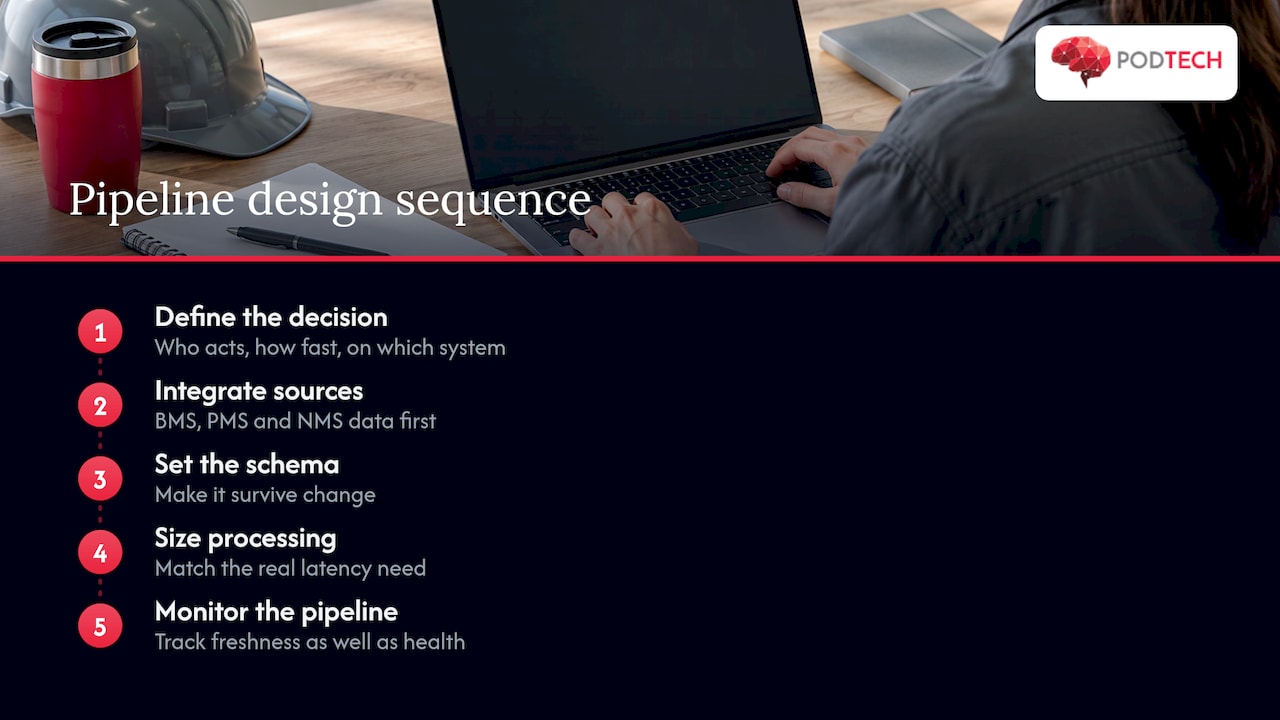
We see the pipeline as the software layer between a sensor event and a decision. Teams often start by choosing a broker. We start from the decision: who must act, how fast, and on which system.
Then we work backwards. Integration of BMS, PMS and NMS sources comes first, because a stream is only as good as the data entering it. Next comes a schema that survives change, then processing sized to the real latency need, then monitoring of freshness as well as health.
That approach comes from delivering over 250 projects for demanding, regulated environments. It is why we build pipelines as part of the wider platform, whether a custom application, a monitoring product or a modernised legacy system.
Harry
Build it with PODTECH
We design and build custom enterprise software for critical infrastructure, including datacenter telemetry and master systems integration, machine learning development and BMS and PMS integration. Our services are backed by a 99.9% uptime SLA and global support, and we work through dedicated teams or staff augmentation so the work fits your operations.
If you are scoping a streaming pipeline for a data centre, building portfolio or plant, start with a conversation about your sources and your latency targets at podtech.com.
FAQ
Are ETL and streaming data pipelines the same thing?
Not quite. ETL describes extracting, transforming and loading data, and it can run in batches. A streaming pipeline performs those steps continuously, which is why Confluent also calls it streaming ETL.
What is the difference between a data stream and a streaming pipeline?
The stream is the continuous flow of events. The pipeline is the system that ingests, processes and delivers that flow to its destinations at the right pace.
Which tools are used to build streaming pipelines?
Common choices are Kafka, Redpanda, Pulsar or Kinesis for transport, Flink or Spark Structured Streaming for processing, and Kafka Connect or Debezium for ingestion, as OLake’s guide lists. Storage and serving typically use a warehouse, lakehouse or operational database.
Do I need streaming if my reports are daily?
Usually not. If hourly or daily freshness meets the decision, scheduled batch or micro-batch is simpler to run and rerun. Streaming earns its cost when delays make the data lose value.
Sources
- What is Data Pipeline? (AWS)
- Streaming Data Pipelines (Confluent)
- What is Data Streaming? (Databricks)
- Batch vs. streaming data processing in Databricks
- Lecture 6: Streaming concepts and data validation (CMU)
- Production considerations for Structured Streaming (Databricks)
- CDC Streaming: Modern Analytics & Data Replication (Qlik)
- What Is Data Streaming? (Domo)
- The Modern Data Streaming Pipeline (Snowflake)
- Build Modern Real-Time Streaming Analytics Applications on AWS
- Real-Time Data Streaming Architecture and Patterns (Artie)
- Data Streaming Architecture: Components and Design (OLake)
- Amazon MSK Migration Guide (AWS)
- Improve and Optimize Data Processing Pipelines (Google SRE)