The Model Context Protocol (MCP) is quietly becoming the plumbing layer for enterprise AI. Developed by Anthropic and now supported across the AI tooling ecosystem, it provides a standardised way to connect AI clients — Claude, OpenAI assistants, and others — directly to the data, APIs, and tools they need to be genuinely useful. PODTECH designs, builds, and delivers custom MCP servers that make this connection secure, governed, and production-ready.
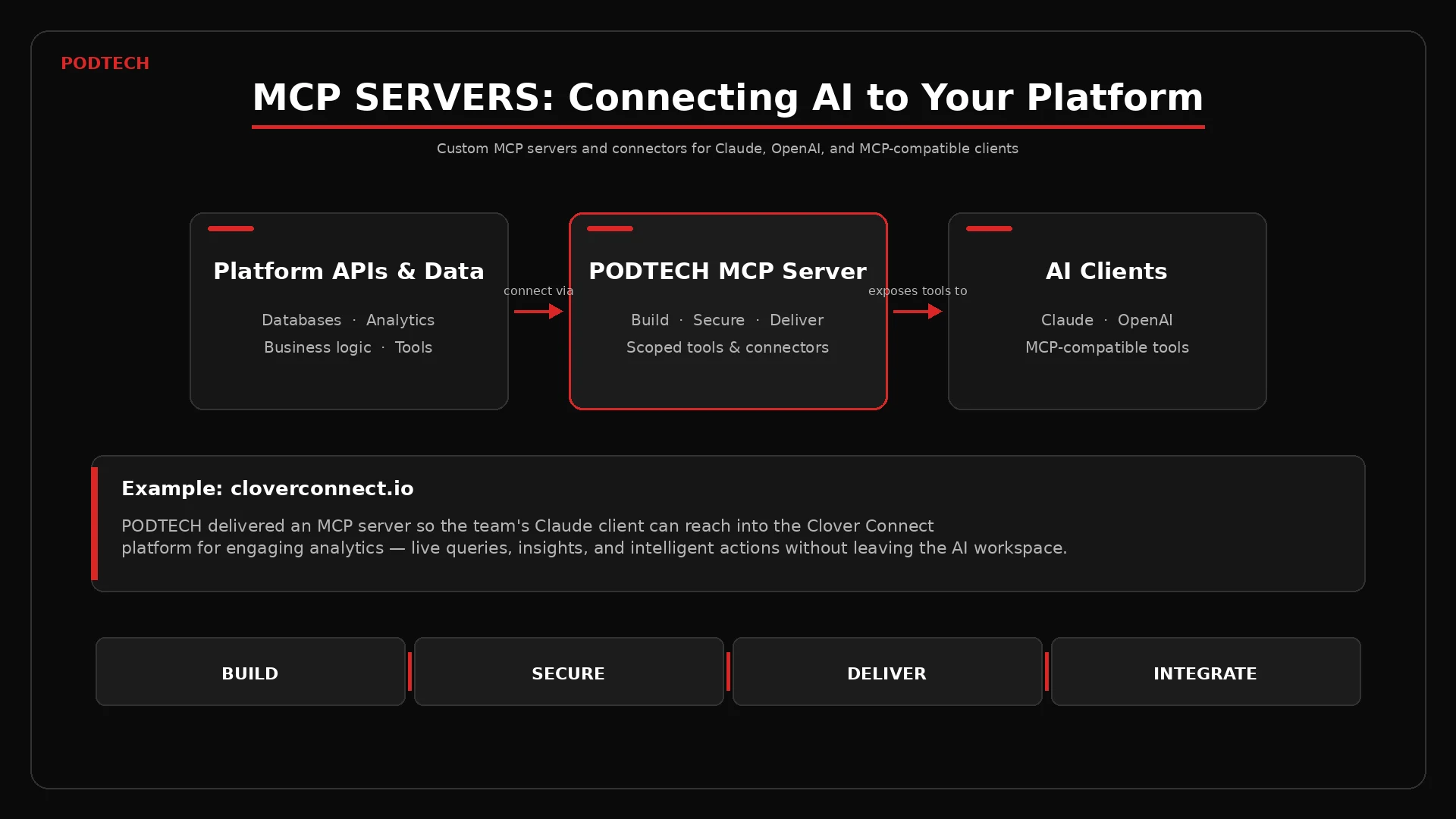
What Is MCP and Why Does It Matter?
Until recently, connecting an AI assistant to a live system meant writing custom integrations from scratch — bespoke API wrappers, prompt engineering hacks, and brittle glue code that broke whenever either side changed. MCP replaces that with a structured, extensible protocol. An MCP server exposes a defined set of tools and resources that any compliant AI client can discover and call at runtime.
The result is a clean separation of concerns: your platform logic lives in the MCP server, and the AI client remains agnostic to the underlying implementation. When Anthropic ships a new version of Claude, or your team switches AI provider, the server does not need to change. For enterprise environments where long-term maintainability matters, this architecture is significantly more robust than ad hoc integrations.
MCP also makes it possible to control precisely what an AI can and cannot do. Rather than giving a language model unrestricted access to your systems, you define a scoped set of tools — each with its own input schema, validation rules, and permission requirements. The AI can only act within the boundary you draw.
What an MCP Server Actually Does
An MCP server is a process that sits between your platform and the AI client. When a user asks Claude a question that requires data from your system, Claude calls the relevant MCP tool, the server handles the request against your API or database, and the result is returned to the conversation context. From the user's perspective, the AI simply knows things — it can query dashboards, retrieve records, trigger workflows, or summarise operational data without any manual copy-paste.
Tools are the core primitive. Each tool has a name, a description the AI uses to decide when to call it, and a typed input schema. Well-designed tools are narrow and composable — a tool that returns a single engagement metric is more useful than one that dumps an entire database record. Good MCP server design is, in practice, good API design: purposeful, documented, and predictable.
What a PODTECH MCP Server Can Expose
- Live analytics queries — engagement rates, usage trends, operational KPIs
- Record retrieval from databases, CRMs, asset management systems, or custom platforms
- Workflow triggers — create tickets, update statuses, dispatch alerts
- Document and knowledge retrieval for internal search and summarisation
- Custom resources — structured data the AI can read without a direct tool call
PODTECH's Delivery Model
PODTECH approaches MCP server delivery in four stages: design, build, secure, and ship.
Design starts with understanding what your team actually needs from an AI assistant connected to your platform. We map the use cases — what questions will people ask, what actions will they want to take — and translate those into a tool inventory. This prevents scope creep and ensures the server stays lean and purposeful.
Build is where the server is implemented against your existing APIs, data sources, or internal services. We work in Node.js or Python depending on the environment, following the MCP specification rigorously so the server is compatible with all compliant clients — not just the one you are using today.
Secure means authentication is handled correctly from day one. MCP servers can authenticate requests via OAuth 2.0, API keys, or session tokens. We implement the appropriate mechanism for your environment, enforce scoped permissions per tool, and ensure the server never leaks credentials or oversteps its defined access boundary.
Ship means the server is production-deployable — containerised, observable, and maintainable. We provide documentation, a tool manifest, and connector configuration files so your team can onboard new AI clients without PODTECH involvement every time.
Case Example: cloverconnect.io
cloverconnect.io
PODTECH built a custom MCP server for the cloverconnect.io team, connecting their Claude environment directly into the Clover Connect platform. The team's AI assistant can now query engagement analytics, pull campaign performance data, and surface actionable insights — all from within a Claude conversation, without leaving the tool or manually exporting reports.
The result is a material change in how the team interacts with their own platform data. Questions that previously required a data analyst, a dashboard login, and several minutes of navigation are answered in seconds, in natural language, with the AI able to follow up, compare periods, or drill into specific segments on request.
This pattern — AI client plus MCP server plus platform API — is applicable across sectors. The connector approach is the same whether the underlying platform is a marketing analytics tool, an operational management system, a financial reporting suite, or a proprietary data product.
Security and Governance Considerations
Giving an AI client access to live platform data is not something to be done without proper controls. PODTECH treats security as a first-class concern in every MCP engagement, not an afterthought.
Tool scoping is the primary mechanism: each tool exposes only what it needs to, and nothing more. A tool that retrieves engagement data for a single campaign has no access to user account information, billing data, or administrative functions. Permissions are enforced at the server level, not left to the AI client to self-regulate.
Auditability matters for enterprise adoption. PODTECH's MCP servers log every tool invocation — timestamp, inputs, outputs, and the identity of the requesting session — to a persistent audit trail. This makes it straightforward to review what the AI accessed, detect anomalies, and demonstrate compliance with internal data governance policies.
For sensitive environments, we implement rate limiting on individual tools, input sanitisation to prevent prompt injection attacks propagating into backend calls, and optional approval flows for tools that trigger write operations.
When to Build a Custom MCP Server
Off-the-shelf MCP connectors exist for common platforms — GitHub, Slack, Google Drive, and others. But if your platform is proprietary, your data model is unusual, or your use case requires business logic that a generic connector cannot handle, a custom server is the right approach.
Signs that a custom MCP server would deliver value:
- Your team regularly exports data from a platform to answer questions in ChatGPT or Claude
- You have an internal platform with no existing MCP connector
- You want AI assistants to trigger actions in your system, not just read data
- You need per-user or per-role scoping on what the AI can access
- You are building an AI-powered product and need a structured tool layer
The investment in a well-built MCP server pays back quickly. Once the server is live, connecting a new AI client is a configuration step, not a development project. As the AI ecosystem continues to expand — more capable models, more specialised clients, new deployment patterns — your platform remains ready to participate without reinvention.
PODTECH builds MCP servers that are production-ready from day one — scoped, secured, and documented. Whether you want to give your team's Claude access to your platform or build a connector as part of a larger AI product, we can scope and deliver it.