POD-A1
The Translation Layer
Between Plant and Platform
Ingest, normalise, buffer, republish.
Facility systems rarely speak the same language. POD-A1 sits on site and reads them anyway — BACnet, Modbus, SNMP, dry contacts, 4–20 mA and a dozen more — then turns what it finds into one consistent set of points. It holds that data locally when the link upstream drops and sends it on when the link returns. Deploy it as a physical appliance or as a virtual machine.
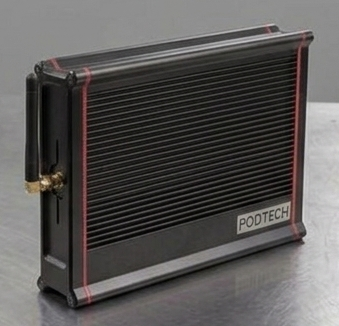
0U
Flexible Mounting
Inside or outside the rack
15+
Protocols Supported
BACnet, Modbus, SNMP, KNX, DALI, M-Bus and more
<5s
Data Latency
Edge to platform, under normal conditions
Buffered
Store & Forward
Held on the appliance, replayed on reconnect
What POD-A1 Does
A facility accumulates systems. A BMS from one vendor, an EPMS from another, UPS kit with its own SNMP tree, a fire panel on dry contacts, access control that exports nothing useful. POD-A1 reads all of it where it sits, gives every point a consistent name and unit, and hands the result to whatever you want to look at it with. Nothing on the facility side has to change.
Reads What Is Already There
Fifteen-plus protocols on one appliance, from BACnet MS/TP and Modbus RTU up to MQTT and REST. Legacy serial kit and modern IP kit on the same box.
Normalisation and Tag Mapping
Disparate vendor tags mapped into one namespace with consistent units. A temperature is a temperature regardless of which panel reported it.
Store and Forward
When the upstream link drops, POD-A1 keeps polling and keeps the readings. When it comes back, the gap is filled rather than lost.
Read-Only at the Edge
Acquisition only. POD-A1 extracts data one way and does not write setpoints into facility systems, so connecting it changes nothing about how the plant runs.
Energy Reporting
Automated PUE calculation, energy reporting and audit trails, aligned to EU Energy Efficiency Directive reporting requirements.
Republishes Anywhere
PODVIEW is the usual destination, but the same normalised stream can go to an existing BMS, an NMS, a DCIM tool or your own API.
Architecture Overview
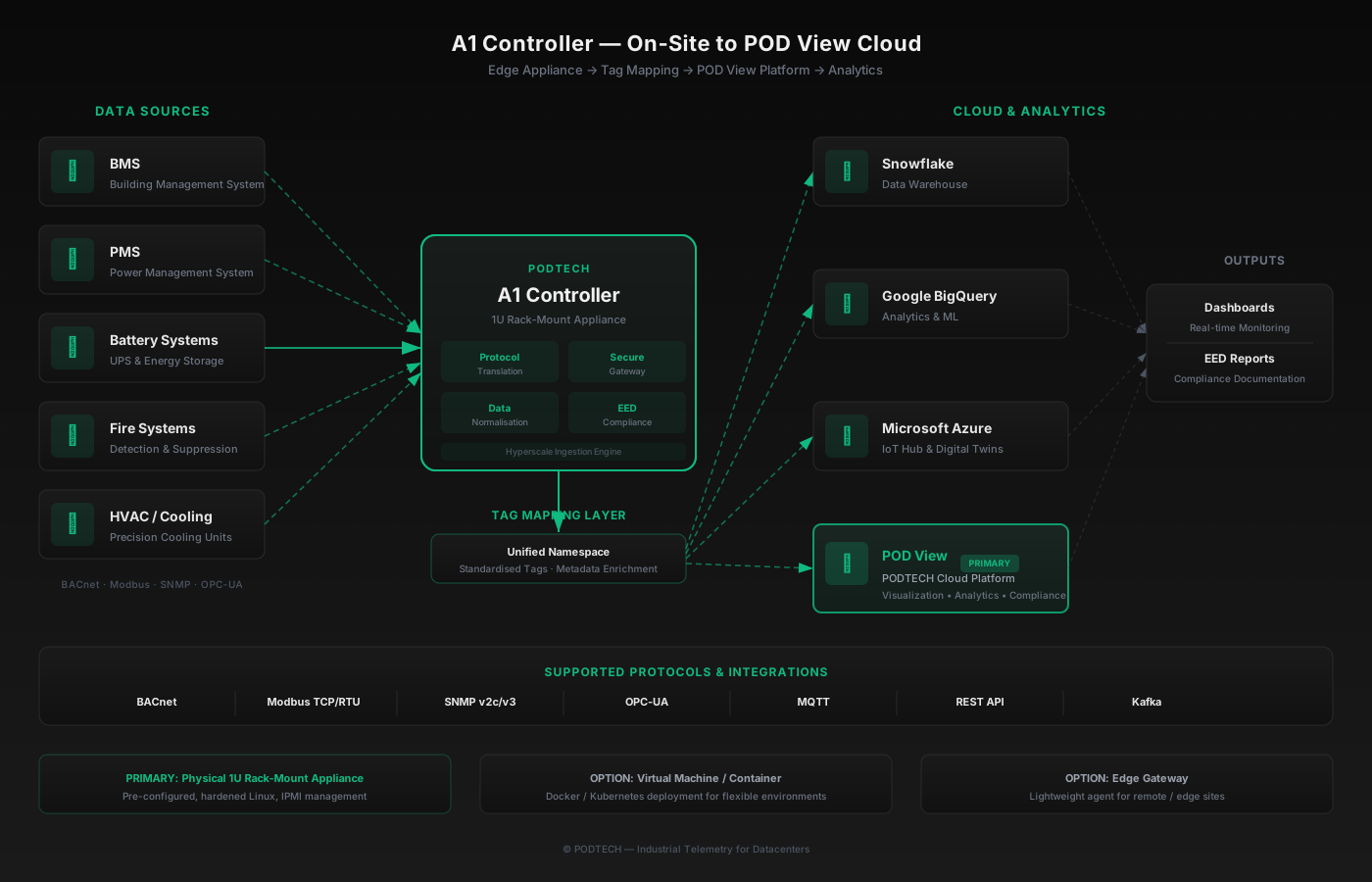
Subsystems on the left, one normalised stream on the right. The appliance does the reading, the mapping and the buffering on site, so the platform never has to know what a particular vendor called register 40021.
What It Speaks
Southbound protocols on the left, the systems they usually belong to on the right. If it is in the building and it publishes anything, there is normally a way in.
Protocols In
Systems Connected
One exception
Everything above is read-only acquisition. The exception is POD-S6, our rack fan controller, which commands fans on its own 48VDC bus. That is a closed loop we supply end to end — it is not a control path into your building systems.
A Working Interface Without the Platform
Plenty of sites want the data before they want a subscription, and commissioning engineers need to see a point respond while they are standing next to it. POD-A1 has its own interface. No cloud account, no platform licence, nothing else to install.
Live Trending
Every point trended on the controller over 24 hours, 7 days and 30 days.
Point Statistics
Current value with minimum, maximum, average and sample count for the window you are looking at.
CSV and PDF Export
Pull a record straight off the appliance for a report or a handover pack.
Provenance on Every Point
Source protocol and device address shown alongside the value, so a suspicious reading can be traced back to the register it came from.
Thresholds and alerts are configured on the controller too. If the platform link is down, or was never bought, the appliance still knows when a value has gone out of range and still says so.
Where the Data Goes
The normalised stream is yours. Send it to PODVIEW, back into systems you already run, or both at once — the appliance can publish to several destinations in parallel.
Destinations
Transports available for any of the above:
Analytics platforms
Where a customer already runs a data platform, the same stream can be pointed at it as an additional destination. This is a secondary path rather than the main one — most operators want the OT integrations above first.
Deployment Options
Flexible deployment to suit your infrastructure — from a dedicated physical appliance to virtualised environments.
Physical Appliance
Purpose-built 0U appliance. Pre-configured, hardened Linux operating system with IPMI out-of-band management. Mounts inside or outside rack. Plug in, connect, and start ingesting.
Virtual Machine
Deploy on existing virtualisation infrastructure. VMware, Hyper-V, and KVM compatible. Ideal for environments with existing compute capacity.
Container
Kubernetes-native deployment with Helm charts. Perfect for cloud-native infrastructure teams and multi-site orchestration.
Built for Every Datacenter
Hyperscale
High point counts across a campus, aggregated per building and then per site. Streaming destinations available where the customer already runs one.
Colocation
Unified monitoring across tenant spaces. Per-client metering, shared infrastructure visibility, and SLA compliance reporting.
Enterprise Edge
Lightweight deployment for enterprise edge sites. Remote management, low-bandwidth optimisation, and centralised analytics.
Security Posture
The first question a security team asks is what this box can do to the plant. The answer is nothing. POD-A1 reads; it does not write. Extraction is one-way, and facility subsystems are never exposed to the client network — the appliance sits between the two and only the normalised output crosses.
Read-Only Acquisition
No setpoints written, no commands issued into BMS, EPMS or fire systems
Store and Forward Through Link Loss
Polling continues locally and the backlog is replayed once the link returns
TLS 1.3 Encrypted Transport
All cloud-bound data encrypted in transit with modern cipher suites
Certificate-Based Authentication
Mutual TLS authentication between appliance and cloud endpoints
Network Isolation
Air-gapped from production networks with firewall-friendly outbound-only connections
Secure Boot & Updates
Signed firmware with verified boot chain and encrypted OTA updates
No Persistent Storage of Credentials
BMS/PMS credentials stored encrypted in hardware security module (HSM)
Compliance & Standards
Penetration Tested
Third-party security audits conducted annually
Start With Your Point List
Send us what is installed and we will tell you what POD-A1 can read from it. If the answer is not obvious from a list, a site survey settles it.