A legacy system assessment is an evidence-based, time-boxed evaluation that surfaces your top risks, identifies where technical debt concentrates, and produces a prioritised modernisation roadmap. Run properly, it takes weeks, not months, and it hands your leadership team something they can act on immediately, not a 200-page document nobody reads.
For a medium-sized service, expect a timebox of several weeks to deliver a workable output. Larger, monolithic estates take longer, but the immediate deliverables stay consistent regardless of scale.
Commission this when you’re facing a modernisation decision, a compliance deadline, an unexplained rise in incidents, or simply when nobody on the team can confidently say what happens if a key system fails. Typical outputs include:
- A ranked list of the top five risks by business impact
- A short set of quick wins deliverable within 90 days
- A recommendation on whether to pilot, remediate, or hold with contingency planning
- An executive summary translating technical findings into cost and risk language finance can use
Pro Tip: If your assessment report doesn’t fit on a single page for the executive summary, it hasn’t done its job yet. Board members act on clarity, not comprehensiveness.
Key Takeaways
A legacy system assessment succeeds when it produces a ranked risk register and executable roadmap within weeks, not a lengthy document that arrives too late to act on.
| Point | Details |
|---|---|
| Timebox the assessment | Aim for one to two weeks on a medium-sized service; use sampling and staging to contain larger estates. |
| Cover all four surfaces | Inventory, architecture, operations, and compliance each need dedicated review, not just code. |
| Use git history as evidence | Commit patterns expose knowledge silos and hot spots even when documentation and departed staff can’t. |
| Quantify debt and risk | Score findings on criticality, exploitability, maintenance cost, and knowledge risk to build a defensible backlog. |
| Partner for delivery continuity | PODTECH’s assessment-led engagements carry findings straight into modernisation delivery. |
Table of Contents
- What does a legacy system assessment actually review?
- Assessment checklist and a step-by-step audit plan
- Scoping and resourcing an assessment: the trade-offs that matter
- How to present assessment findings to technical and non-technical stakeholders
- Building the business case: TCO, ROI, and the cost of inaction
- A simple risk-ranking model for prioritisation
- Turning the assessment into a delivery roadmap
- PODTECH’s approach to running assessments
- Why data quality problems hide inside legacy systems longer than anywhere else
- Why end-user feedback belongs in every legacy technology review
- Quantifying technical debt: putting a number on the mess
- Editorial perspective: what actually separates a useful assessment from a wasted one
- Turn your assessment into a modernisation partnership
- Standards and resources worth bookmarking
- Sources
What does a legacy system assessment actually review?
A thorough legacy application audit covers four surfaces: inventory, architecture, operations, and compliance. Skipping any one of them leaves gaps that surface later, usually at the worst possible moment.
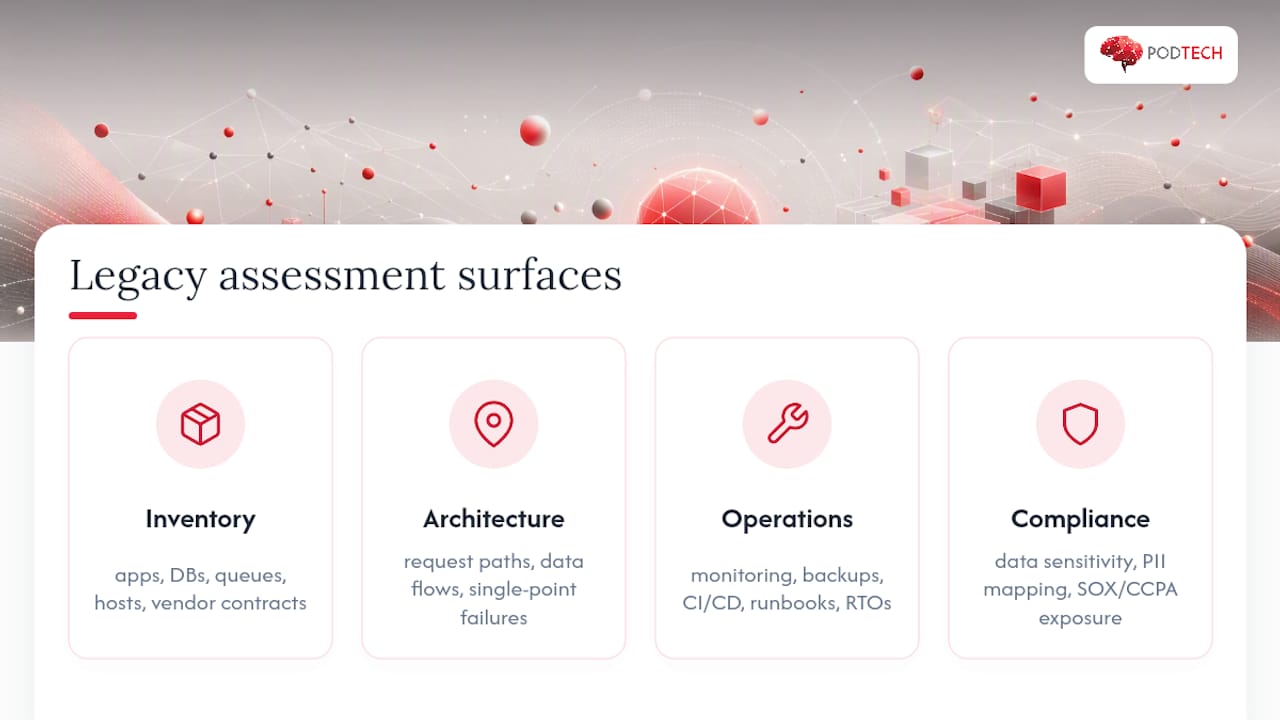
Inventory comes first because you cannot assess what you haven’t catalogued. This means every application, database, message queue, integration point, host, and piece of middleware in scope, along with the vendor contracts and support agreements attached to each. It’s common for organisations to discover systems during this phase that nobody on the current team knew existed. Undocumented cron jobs, forgotten API gateways, and databases with no clear owner are the norm, not the exception, in estates over a decade old.
Architecture mapping comes next. This traces request paths end to end, follows data as it moves between systems, and flags single points of failure. It also surfaces latent dependencies, the kind where Service A quietly relies on a side effect of Service B that nobody documented.
Operational surface review checks monitoring coverage, backup integrity, CI/CD maturity, incident runbooks, and recovery time objectives. A system with no tested backup restoration process is a live risk, however stable it looks day to day.
Compliance surface review classifies data sensitivity, maps PII handling, and checks exposure under frameworks such as SOX and CCPA. This is where a legacy technology review moves from an engineering exercise into a governance one, because regulatory gaps carry financial and legal consequences that outrank most technical concerns.
Assessment checklist and a step-by-step audit plan
Here’s a practical sequence for how to evaluate legacy systems without the engagement sprawling into months of low-value analysis.
- Pre-engagement scoping. Define what’s in and out of scope, build a RACI for stakeholders, compile an access list repos, admin consoles, cloud accounts, and VPN credentials, and document non-functional constraints like uptime windows and change freezes.
- Automated scans first. Run dependency scanners, vulnerability scans, and licence checks before anyone reads a line of code by hand. This surfaces low-hanging risk immediately and tells you where to focus manual effort.
- Codebase audit. Read git history to find hot-spot files and contributor concentration. A time-boxed audit that combines static analysis with git history and an end-to-end trace of a key user journey produces a genuinely actionable report rather than a theoretical one.
- Architecture trace. Pick one critical user journey checkout, login, or a core transaction and follow it through every system it touches. This single exercise usually reveals more about real dependency risk than a week of documentation review.
- Ops and runbook review. Check whether incident response actually matches what’s written down, and whether anyone has tested a full recovery in the last twelve months.
For tooling, keep it vendor-neutral: static analysis tools flag complexity hotspots, dependency scanners flag outdated or abandoned packages, and a coverage snapshot from your test suite tells you how much of the system is actually protected against regression. None of this requires exotic tooling, just discipline in running it consistently.
Each phase should produce a concrete artefact rather than notes in someone’s head: an evidence pack backing every claim, an updated architecture diagram, and a risk register with severity ratings and remediation suggestions attached to each item.
Pro Tip: Commit history is often more reliable than documentation. Analysing file-change frequency and contributor distribution exposes knowledge silos even when the person who wrote the code has long since left. Treat the repository as a witness, not just a code store.
Scoping and resourcing an assessment: the trade-offs that matter
The biggest mistake IT leaders make when commissioning a legacy system audit is trying to boil the ocean. Decide early whether you need a focused service audit or an estate-wide review, and whether you’re sampling representative systems or examining a full monolith line by line.
A focused audit targets one business-critical service and produces depth. An estate-wide audit samples across many systems to establish a risk heatmap, then drills into the worst offenders. Most organisations get more value from the second approach first, because it tells you where to spend your deeper audit budget.
Staffing follows a predictable pattern:
- One lead assessor to own scope, findings, and the final report
- One to two engineers for hands-on code and architecture audit work
- Subject matter expert interviews with whoever still understands the “why” behind old decisions
- An executive sponsor who can unblock access and keep the engagement moving
Duration scales with complexity, not headcount. A medium-sized service with clear boundaries typically takes one to two weeks. A tangled monolith with decades of undocumented business logic can take several weeks even with a full team, because the risk isn’t reading the code, it’s understanding what it’s actually for.
Three containment techniques keep costs and risk manageable: time-boxing every phase strictly, sampling representative user journeys instead of testing everything, and running staged audits where an initial light pass identifies which systems earn a deeper second look.
How to present assessment findings to technical and non-technical stakeholders
The report itself is where most assessments succeed or fail, not the audit work behind it. A structure that works consistently: scope and method, an architecture diagram, top risks ranked by impact, hot spots, quick wins, a strategic roadmap, and cost ranges.
The hardest skill here is translation. Engineers naturally describe findings in technical terms, “this service has a single point of failure in its authentication layer”, while your board needs to hear “a failure here stops every customer login and costs an estimated amount per hour of downtime.” Every technical risk in the report should carry a business impact statement: downtime cost, regulatory exposure, or dependency on a single person who holds undocumented knowledge.
Finance and the board typically want three things from the report:
- Credible cost ranges rather than false-precision figures nobody believes
- A realistic ROI horizon, distinguishing quick wins from multi-year strategic work
- A clear risk-of-inaction scenario, because doing nothing is always an option leadership is silently choosing
The NIST Cybersecurity Framework identify, protect, detect, respond, recover structure gives a useful lens for organising the risk section, since it maps naturally onto both technical controls and the language auditors and regulators already use.
Building the business case: TCO, ROI, and the cost of inaction
Your total cost of ownership calculation needs to go beyond hosting and licensing. Include ongoing maintenance effort, vendor support contracts especially ones nearing end-of-life pricing hikes, compliance overhead, and what’s often called innovation drag, the tax every new feature pays because it has to work around legacy constraints first.
Frame ROI across three horizons rather than one lump projection:
- Immediate: quick wins delivering measurable savings within the first quarter
- Medium-term: efficiency gains from removing manual workarounds and reducing incident volume
- Long-term: strategic enablement, meaning the platform can actually support what the business wants to build next
Well-executed modernisation delivers strong ROI, but projects fail frequently when organisations skip incremental approaches and proper change management. Two cautionary points consistently trip up otherwise sound business cases: dual-run costs during migration paying for old and new simultaneously and the J-curve effect, where things get measurably worse before they improve. Set realistic timelines that account for both, or your board will lose confidence exactly when the project needs it most.
A simple risk-ranking model for prioritisation
Once findings are in, score every risk against five axes: business criticality, security exploitability, ongoing maintenance cost, availability impact, and knowledge risk how much depends on one person or undocumented tribal knowledge.
A basic rubric works well because it forces consistency. Score each axis from 1 to 5, define the criteria in advance, and multiply or weight the categories according to what matters most in your environment. A payments platform may weight availability and compliance more heavily. An internal operations tool may weight maintenance cost and knowledge risk higher.
The point is not mathematical elegance. The point is to create a defensible prioritisation method that survives scrutiny from engineering, security, finance, and leadership. If two teams disagree about what should happen first, the scoring model gives you a shared frame for resolving it.
A practical output from this section is a ranked register that separates work into three bands:
- Act now for high-impact, high-likelihood risks with clear business exposure
- Plan next for material issues that need design, budget, or sequencing
- Monitor or accept for lower-priority items where mitigation cost exceeds near-term value
Turning the assessment into a delivery roadmap
An assessment only becomes useful when it turns into sequencing. That means translating findings into a roadmap with owners, dependencies, budget ranges, and decision gates. Without that step, even a strong audit becomes shelfware.
Start by separating stabilisation from modernisation. Stabilisation work reduces immediate risk: patching unsupported dependencies, improving monitoring, documenting recovery procedures, and removing obvious single points of failure. Modernisation work changes the shape of the platform: decomposing a monolith, replacing brittle integrations, replatforming infrastructure, or redesigning data flows.
A practical roadmap usually has three layers:
- 0–90 days: quick wins, urgent remediation, and evidence-building work
- 3–12 months: medium-sized changes that reduce recurring operational drag
- 12+ months: strategic platform moves that require broader business alignment
The best roadmaps also include explicit decision points. For example: after a 90-day stabilisation phase, decide whether to continue remediation, launch a pilot replacement, or hold the current platform with contingency planning. This prevents organisations from drifting into expensive transformation programmes without evidence that the next step is justified.
PODTECH’s approach to running assessments
At PODTECH, we treat a legacy system assessment as the first delivery phase, not a detached consulting exercise. That changes the standard of evidence. Findings need to be specific enough that an engineering team can pick them up and act, not just agree that they sound plausible.
Our approach is built around a few principles:
- Time-boxed discovery so the engagement produces decisions quickly
- Evidence over opinion using code, infrastructure, logs, configs, and git history
- Business translation so technical findings map to cost, risk, and delivery impact
- Continuity into execution so the same context carries into remediation or modernisation
In practice, that means we don’t stop at “the system is risky.” We identify where the risk concentrates, what can be improved in the next quarter, what should be deferred, and what architectural choices are likely to produce the best return. If the right answer is to hold and harden rather than replace, the assessment should say that clearly too.
Why data quality problems hide inside legacy systems longer than anywhere else
Legacy systems are unusually good at concealing data quality issues because they often continue to function despite them. A field gets repurposed, validation rules drift, duplicate records accumulate, and downstream teams quietly build workarounds. The application still “works,” so the problem remains invisible until a migration, audit, or analytics initiative forces the data into the open.
This is why a serious assessment looks beyond code and infrastructure into the shape and trust level of the data itself. You need to know where canonical records live, which systems overwrite each other, where manual corrections happen, and whether reporting logic depends on undocumented assumptions.
Common warning signs include:
- Multiple systems claiming to be the source of truth for the same entity
- Frequent spreadsheet reconciliations outside the platform
- Business rules embedded in reports rather than in the application layer
- High exception-handling volume that staff treat as normal operations
If you ignore data quality during assessment, you risk underestimating migration effort and overstating the speed of any replacement programme. Dirty data is one of the most common reasons modernisation timelines slip.
Why end-user feedback belongs in every legacy technology review
Technical teams often assess legacy systems from the inside out: code quality, architecture, infrastructure, and security posture. That’s necessary, but incomplete. End users see the friction that architecture diagrams miss. They know where the process stalls, where the interface encourages mistakes, and where unofficial workarounds have become part of the real operating model.
A short set of structured interviews with frontline users, support teams, and operational owners can reveal hidden costs faster than another day of code review. If a system forces people to re-enter data, wait for overnight jobs, or maintain shadow processes in email and spreadsheets, that is part of the platform’s true cost profile.
Useful questions include:
- Where do you leave the system to finish the job?
- What breaks most often, even if it’s considered normal?
- Which tasks depend on one experienced person knowing the workaround?
- What would you fix first if you had one quarter?
This feedback doesn’t replace technical analysis. It sharpens it. It helps you distinguish between issues that are merely untidy and issues that are actively damaging productivity, customer experience, or control.
Quantifying technical debt: putting a number on the mess
Technical debt becomes easier to fund when it stops sounding abstract. The goal is not to pretend you can calculate it with perfect precision. The goal is to estimate its operational and delivery cost well enough that leadership can compare it against other investments.
There are several practical ways to quantify it:
- Change failure rate: how often releases cause incidents or rollback
- Lead time for change: how long simple changes take because the system is hard to modify safely
- Incident burden: recurring support effort tied to fragile components
- Knowledge concentration: how much delivery depends on a shrinking set of people
- Opportunity cost: features delayed or abandoned because the platform cannot support them efficiently
Static analysis can help identify complexity and duplication, but the strongest debt signal is often behavioural. If the team avoids touching a module, if releases slow down around certain areas, or if every enhancement requires defensive work first, that is debt expressing itself in delivery terms.
A useful assessment converts those signals into a backlog with rough remediation effort and likely payoff. That’s what turns “we know it’s messy” into “we know which mess is worth paying down first.”
Editorial perspective: what actually separates a useful assessment from a wasted one
The difference is rarely technical sophistication. It’s decision quality. A wasted assessment produces a long list of observations with no prioritisation, no ownership, and no clear next move. A useful one narrows uncertainty enough that leadership can choose confidently between remediation, replacement, pilot modernisation, or managed hold.
That means resisting two common failure modes. The first is excessive breadth: trying to inspect everything equally and ending up with shallow conclusions. The second is excessive technicality: producing findings that engineers respect but executives cannot use. The best assessments are selective, evidence-backed, and translated into business consequences.
In practical terms, a useful assessment should answer questions like:
- What are the top risks if we do nothing for 12 months?
- What can we improve in 90 days without major disruption?
- Which systems deserve deeper investment and which do not?
- What is the most credible path forward given budget, timing, and risk appetite?
If the report cannot answer those questions clearly, it may be informative, but it is not yet useful.
Turn your assessment into a modernisation partnership
The strongest outcome from a legacy system assessment is not the document. It’s momentum. Once the top risks, quick wins, and strategic options are visible, the next challenge is execution: sequencing work, protecting business continuity, and modernising without creating new instability.
That’s where an assessment-led partnership matters. Instead of handing findings to a separate team and losing context, you carry the evidence, priorities, and architectural understanding directly into delivery. This reduces rework, shortens decision cycles, and keeps the roadmap grounded in what the system actually is, not what everyone hopes it might be.
If you’re preparing for a compliance deadline, planning a platform refresh, or trying to understand whether a critical legacy service should be remediated or replaced, start with a time-boxed assessment that produces decisions, not just documentation.
Need a clear view of your legacy risk?
PODTECH runs assessment-led modernisation engagements that move from evidence to execution quickly. If you need a ranked risk view, a 90-day action plan, or a roadmap for remediation and replacement, we can help turn uncertainty into a delivery plan.
Standards and resources worth bookmarking
A good assessment does not need to be framework-heavy, but it should be framework-aware. These references are especially useful when you need to align technical findings with governance, security, and board-level reporting:
- NIST Cybersecurity Framework for structuring risk across identify, protect, detect, respond, and recover
- OWASP guidance for application security review and common vulnerability classes
- Vendor lifecycle notices for end-of-support and end-of-life exposure
- Internal incident and change data for grounding debt and fragility in real operational evidence
- Architecture decision records and git history for reconstructing why the system evolved the way it did
The key is not to drown the engagement in references. It’s to use standards where they improve clarity, comparability, and credibility.
Sources
- Codably — How to audit a legacy codebase
- Congressional Budget Office — analysis relevant to software maintenance and legacy system cost pressures
- NIST Cybersecurity Framework
A legacy system assessment should leave you with a ranked risk view, a practical 90-day plan, and a credible path to modernisation. If it doesn’t, it was analysis without consequence.